Where the game runs
Your Mac runs WoW and displays the game. The iPhone is the input surface: movement and camera sticks, face buttons, D-pad, shoulders and triggers. Thumble sends those controls to its Mac receiver over the local network.
This setup is for watching your Mac while holding your phone. If your goal is to see the game on your iPhone while away from the Mac, you need to evaluate a game-streaming setup instead. Thumble does not provide video streaming or a native iPhone version of WoW.
What you need before you start
- A Mac with macOS 15 or later: the published receiver supports Apple silicon and Intel.
- WoW and ConsolePort: match the addon release to the exact game client you launch.
- Thumble on the phone and Mac: the receiver is available, but the phone apps are still being prepared for public release.
- The same local Wi-Fi: both devices must be able to communicate. Guest networks can isolate devices.
The built-in ConsolePort controller needs no AI agent or cloud account. See the current requirements and release scope before preparing a setup.
The documented Thumble companion addon 0.1.2 supports Classic Era 1.15.9. That file is not a compatibility promise for other WoW clients. Check the addon release for your installation.
Prepare the phone-controller workflow
Use this sequence when you have access to a supported phone build. Public visitors can prepare their Mac and join launch updates now.
- Install the Mac receiver. Follow the receiver installation instructions and keep it running.
- Pair the iPhone. In Thumble, choose Set up WoW, select your client and scan a fresh receiver pairing code. Allow camera and local-network access when requested.
- Prepare ConsolePort. Install it in the WoW installation you actually launch. Configure your actions and modifier combinations in the game using the ConsolePort setup guide.
- Check controls in WoW. Verify movement and stopping, camera, an action, a modifier combination and menu navigation.
A screenshot or successful phone pairing is not proof of working game input. Offline practice checks the phone controls; complete the five in-game checks for your own client and controller.
Understand buttons, labels and bindings
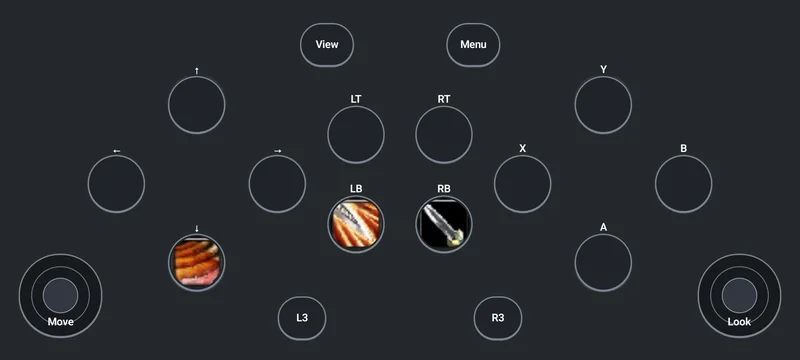
ConsolePort chooses which in-game actions correspond to buttons and modifier layers. The phone displays the controller you use to send those inputs. A spell picture or changed label on the phone does not itself bind a WoW action.
The matching Thumble companion addon can help with recovery and documented ConsolePort spell-label updates. If labels and actions disagree, check the character’s actual ConsolePort bindings before changing more settings.
Decide whether touch controls suit your session
Try reaching the sticks and buttons while holding the phone comfortably. Consider whether you can find a modifier without taking your eyes off the Mac, whether the phone is needed for another task, and whether you prefer physical button feedback.
A physical gamepad may be a better fit if tactile sticks and buttons matter most to you. Read the phone versus physical controller comparison before choosing a setup. Neither option avoids the need to verify WoW bindings.
Thumble’s planned demo includes 30 minutes total of connected controller use across sessions. Pro is planned at $19.99 USD once and removes the time limit; local store prices may vary. The phone app and purchase remain coming soon.
If the connection or game input fails
For a phone that will not connect, start with Wi-Fi, permissions and pairing-code checks. If the phone is connected but the game ignores it, use the WoW controller-detection guide. These are different stages of the setup.
You can still use a compatible physical gamepad while waiting for the phone release. Apple documents connecting controllers to Mac; ConsolePort configuration remains a separate game-side step.
Sources and scope
Thumble setup, requirements and availability · ConsolePort official release files · Apple controller connection guide
This guide describes the documented Thumble workflow and current availability. It does not certify every iPhone, WoW client or controller combination. The complete phone-to-game setup still needs verification on your own supported builds.
Get ready for phone controls
The Thumble phone apps are coming soon. Get launch updates while you prepare your WoW setup.